

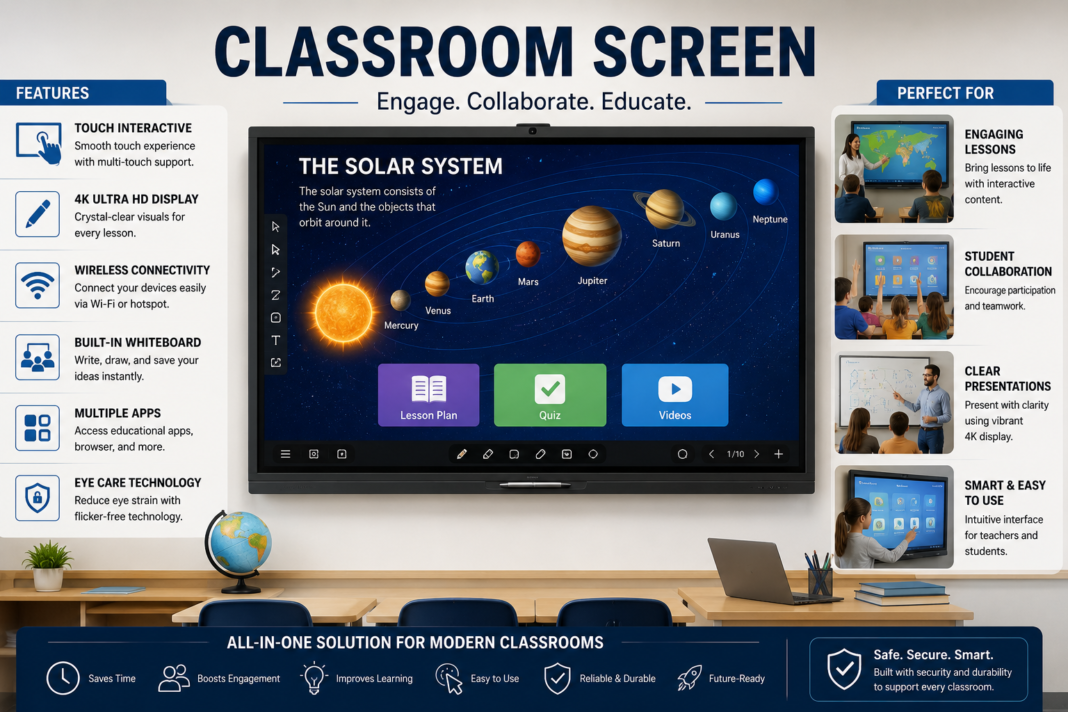

Technology has transformed nearly every aspect of education, and one of the most practical innovations for teachers is the Classroom Screen. What began as a simple projection surface has evolved into a powerful digital hub that supports instruction, classroom management, student engagement, collaboration, and communication.
Modern educators face increasing demands. They must manage diverse learning styles, maintain student attention, organize daily activities, communicate expectations clearly, and deliver lessons that remain engaging in both physical and virtual settings. A well-designed classroom screen helps accomplish all these goals by centralizing information and creating a visually structured learning environment.
Whether displayed through an interactive whiteboard, smart display, projector, touchscreen monitor, or web-based platform, a classroom screen serves as the focal point of daily instruction. It provides students with immediate access to schedules, timers, learning objectives, visual aids, assignments, and collaborative activities.
As schools continue adopting educational technology, understanding how to effectively use screen-based teaching tools becomes increasingly important. This guide explores everything educators, administrators, and instructional leaders need to know about implementing, optimizing, and maximizing the value of digital classroom displays.
Understanding the Modern Classroom Screen
A classroom screen is much more than a digital display. It functions as an instructional command center that organizes learning activities, provides visual guidance, and helps teachers communicate efficiently throughout the day.
In today’s educational environments, these screens may appear as interactive smart boards, touchscreen displays, projector systems, or browser-based platforms that present information to students in a structured and visually engaging format. Their versatility makes them suitable for elementary schools, secondary schools, higher education institutions, and corporate training environments.
How Classroom Displays Have Evolved
Traditional chalkboards and whiteboards served generations of educators well, but they offered limited flexibility. Teachers had to manually write information, erase content repeatedly, and spend valuable instructional time updating visual materials.
Digital learning environments have dramatically changed expectations. Today’s educational displays allow teachers to instantly present multimedia content, interactive exercises, collaborative activities, videos, animations, and real-time information that enhance student understanding and participation.
Why Visual Learning Matters
Research consistently shows that visual information helps learners process and retain concepts more effectively. Students often understand complex topics faster when information is presented through images, diagrams, charts, videos, and organized visual layouts.
A classroom screen supports visual learning by making important information accessible at all times. Students can quickly reference schedules, objectives, instructions, and lesson materials without repeatedly asking for clarification, creating a smoother learning experience.
The Growing Importance of Educational Technology
Schools increasingly recognize technology as a tool that supports instructional effectiveness rather than simply replacing traditional methods. Educational technology enables teachers to personalize learning experiences and reach students through multiple engagement channels.
The integration of digital displays aligns with broader educational goals, including student-centered learning, collaboration, accessibility, and data-informed instruction. As a result, screen-based teaching tools have become foundational elements in many modern classrooms.
Core Features Found in a Classroom Screen
Most digital classroom display platforms include practical tools that simplify classroom management and improve instructional delivery. These features help teachers maintain organization while reducing administrative workload.
Common functions include timers, random name selectors, noise meters, polls, calendars, instructional widgets, annotation tools, QR code generators, visual schedules, and interactive activities that support daily teaching operations.
Benefits for Teachers
Teachers often spend significant time managing transitions, organizing materials, and communicating expectations. A classroom screen streamlines many of these responsibilities by providing a centralized visual reference for students.
When instructions, schedules, and learning goals remain visible throughout the lesson, teachers can focus more on instruction and student interaction instead of repeatedly addressing procedural questions.
Benefits for Students
Students benefit from increased clarity, consistency, and engagement. Visual displays provide immediate access to important information, reducing confusion and helping learners remain focused on classroom objectives.
Many students, particularly visual learners and multilingual learners, appreciate having instructions displayed clearly. This accessibility supports independence and encourages greater participation in classroom activities.
Supporting Classroom Management
Effective classroom management depends on clear expectations and predictable routines. Digital displays make these expectations visible and consistent throughout the school day.
Timers, behavior reminders, schedules, and transition cues help students understand what is happening next, reducing disruptions and supporting smoother classroom operations.
Creating Structure Through Visual Organization
Students thrive when learning environments are organized and predictable. A classroom screen helps establish structure by displaying daily agendas, lesson objectives, classroom rules, and assignment deadlines.
Visual organization minimizes uncertainty and creates a learning atmosphere where students can focus their attention on academic tasks rather than procedural confusion.
Interactive Learning Opportunities
Interactive displays transform passive learning into active participation. Students can engage directly with content through touchscreen interactions, collaborative activities, quizzes, and educational games.
These opportunities encourage critical thinking, discussion, problem-solving, and deeper engagement with lesson materials, making learning more memorable and meaningful.
Classroom Screen Tools and Their Functions
The most effective digital displays incorporate a variety of tools that address different instructional needs. Each feature serves a specific purpose while contributing to overall classroom efficiency.
The following table highlights common tools and their educational applications.
| Tool | Primary Purpose | Educational Benefit |
| Timer | Manage activities | Improves pacing and transitions |
| Random Name Picker | Student participation | Encourages equitable engagement |
| Noise Meter | Monitor classroom volume | Supports behavior management |
| Polling Tool | Collect responses | Increases interaction |
| Calendar | Schedule visibility | Enhances organization |
| QR Code Generator | Share resources | Simplifies access to materials |
| Annotation Tool | Highlight content | Improves comprehension |
| Stopwatch | Track activities | Supports time awareness |
| Exit Ticket Feature | Assess understanding | Provides quick feedback |
| Visual Instructions | Guide tasks | Reduces confusion |
Enhancing Student Engagement
Student engagement remains one of the most important factors influencing academic success. When learners actively participate, they are more likely to retain information and develop deeper understanding.
A classroom screen supports engagement by introducing dynamic visuals, interactive tasks, multimedia resources, and collaborative opportunities that capture attention and sustain interest throughout lessons.
Using Multimedia Effectively
Videos, animations, simulations, and interactive graphics help explain concepts that may be difficult to communicate through text alone. Multimedia resources can make abstract topics more concrete and understandable.
When integrated thoughtfully, these resources enrich instruction and provide alternative pathways for comprehension, particularly for students who benefit from visual or experiential learning.
Building Collaborative Learning Experiences
Collaboration prepares students for real-world environments where teamwork and communication are essential. Digital displays facilitate group activities by providing shared workspaces and visual references.
Students can collectively analyze information, solve problems, brainstorm ideas, and present findings using screen-based tools that support cooperative learning.
Supporting Different Learning Styles
Every classroom contains learners with unique strengths and preferences. Some students excel through visual content, while others benefit from auditory explanations or hands-on experiences.
Digital classroom displays support differentiated instruction by enabling teachers to combine multiple forms of content within a single lesson, increasing accessibility for diverse learners.
Accessibility and Inclusive Education
Inclusive classrooms require tools that accommodate varying needs and abilities. Visual displays can support accessibility through larger text, visual supports, captions, color coding, and multilingual content.
By reducing barriers to information access, a classroom screen contributes to more equitable educational experiences for all students.
Remote and Hybrid Learning Applications
The rise of remote and hybrid education highlighted the importance of digital teaching tools. Screen-based platforms allow educators to maintain consistency across learning environments.
Whether students attend in person or online, visual displays help ensure that instructions, objectives, and resources remain accessible and organized.
Improving Lesson Flow
One challenge educators frequently encounter is maintaining lesson momentum. Frequent interruptions and unclear transitions can reduce instructional effectiveness and student focus.
Displaying agendas, timers, and activity instructions helps lessons progress smoothly while minimizing downtime and maximizing productive learning time.
Data-Driven Teaching Support
Modern educational technology increasingly supports data collection and analysis. Interactive displays can provide insights into participation, assessment results, and engagement trends.
Teachers can use this information to identify learning gaps, adjust instructional strategies, and provide targeted support where it is needed most.
Classroom Screen and Student Independence
Independent learning is a valuable educational goal. Students who can navigate tasks without constant teacher assistance often develop stronger confidence and problem-solving abilities.
Visible instructions, schedules, and expectations empower students to manage their responsibilities more effectively, fostering autonomy and accountability.
Using Classroom Screens in Elementary Education
Elementary classrooms benefit tremendously from visual structure and predictable routines. Young learners often rely on visual cues to understand expectations, transitions, and daily activities.
A classroom screen can display morning messages, learning targets, activity rotations, behavior reminders, and countdown timers that help children develop confidence and independence throughout the school day.
Applications in Middle School Classrooms
Middle school students experience increasing academic complexity and greater responsibility for managing assignments and schedules. Digital displays help organize this growing workload effectively.
Teachers can use visual agendas, assignment reminders, discussion prompts, and collaborative activities to keep students engaged while promoting accountability and self-management skills.
Supporting High School Instruction
High school classrooms frequently involve advanced content, project-based learning, and preparation for higher education or careers. Digital displays provide a central location for organizing these demanding learning experiences.
From displaying research resources to facilitating classroom discussions and presenting data visualizations, screen-based tools support deeper academic exploration and critical thinking.
Higher Education and Training Environments
Colleges, universities, and professional training programs increasingly rely on digital displays to support lectures, workshops, and collaborative projects. Learners expect interactive and technology-enhanced experiences.
A classroom screen in these settings can facilitate presentations, collaborative problem-solving, live polling, and multimedia instruction that enriches the learning environment.
Daily Agenda Displays
One of the most effective uses of a classroom screen is displaying the day’s agenda. Students immediately understand what activities will occur and how instructional time is organized.
Visible agendas reduce uncertainty and help learners mentally prepare for upcoming tasks, improving focus and participation throughout lessons.
Displaying Learning Objectives
Clearly communicating lesson objectives helps students understand the purpose behind instructional activities. Learning targets provide direction and establish measurable expectations.
When objectives remain visible during instruction, students can connect activities to desired outcomes and monitor their own progress more effectively.
Using Timers for Better Time Management
Time management challenges affect both students and teachers. Activities can easily run too long or transitions may consume valuable instructional minutes.
Visible timers encourage efficiency by helping everyone understand how much time remains. Students often become more focused when they can monitor progress toward deadlines.
Facilitating Classroom Transitions
Transitions between activities can significantly impact classroom productivity. Unstructured transitions often lead to distractions, noise, and lost learning time.
Digital displays support smoother transitions by providing countdowns, visual instructions, and reminders that guide students from one activity to the next.
Encouraging Student Participation
Many teachers strive to ensure every student has opportunities to contribute during class discussions. However, participation can sometimes become concentrated among a few individuals.
Features such as random name selectors help create equitable participation opportunities while encouraging all students to remain prepared and engaged.
Interactive Questioning Techniques
Questioning remains one of the most powerful instructional strategies. Interactive displays make questioning more engaging through polls, quizzes, and collaborative response activities.
Students can share ideas, respond anonymously when appropriate, and participate more actively than they might in traditional question-and-answer formats.
Supporting Formative Assessment
Effective teaching depends on understanding what students know and where misconceptions exist. Formative assessment provides this insight throughout the learning process.
A classroom screen can facilitate quick checks for understanding through polls, exit tickets, response systems, and interactive exercises that provide immediate feedback.
Real-Time Feedback Opportunities
Timely feedback helps students correct misunderstandings before they become larger learning obstacles. Immediate feedback also strengthens motivation and confidence.
Interactive display tools allow educators to review responses quickly and adjust instruction based on student needs, creating a more responsive learning environment.
Gamification and Student Motivation
Gamification incorporates elements of games into educational experiences. These strategies often increase participation, enthusiasm, and persistence among learners.
Digital displays support gamification through interactive challenges, points systems, quizzes, collaborative competitions, and achievement tracking mechanisms.
Enhancing Group Work
Collaborative learning activities require clear communication and organization. Without structure, group tasks can become confusing or inefficient.
A classroom screen provides visible instructions, timelines, objectives, and shared resources that help groups stay focused and productive during collaborative assignments.
Visual Communication Strategies
Effective communication extends beyond spoken instruction. Visual communication reinforces key messages and helps learners process information more effectively.
Icons, color coding, graphics, charts, and organized layouts make content easier to understand while reducing cognitive overload for students.
Classroom Screen for Language Learning
Language acquisition benefits significantly from visual support. Students learning new languages often rely on images, demonstrations, and contextual clues to build understanding.
Teachers can display vocabulary words, visual prompts, pronunciation guides, and interactive exercises that strengthen language development and comprehension.
STEM Education Applications
Science, technology, engineering, and mathematics subjects frequently involve complex concepts that benefit from visual representation. Interactive displays make abstract ideas more tangible.
Simulations, graphs, diagrams, virtual experiments, and collaborative problem-solving activities help students engage more deeply with STEM content.
Supporting Literacy Development
Literacy instruction increasingly incorporates multimedia resources alongside traditional reading and writing activities. Digital displays expand opportunities for literacy engagement.
Teachers can present reading passages, writing prompts, vocabulary exercises, and collaborative annotation activities that strengthen literacy skills across grade levels.
Social Studies and Humanities Instruction
Historical events, cultural topics, and societal issues often benefit from rich visual context. Maps, timelines, images, and primary sources enhance understanding.
A classroom screen enables educators to integrate these resources seamlessly while encouraging discussion, analysis, and critical evaluation of information.
Science Instruction and Demonstrations
Science education thrives when students can observe processes and phenomena clearly. Digital displays support demonstrations that might otherwise be difficult to visualize.
Animations, laboratory simulations, diagrams, and video demonstrations help learners understand scientific principles and connect theory with observation.
Art and Creative Learning
Creative disciplines also benefit from digital display technology. Visual inspiration, instructional demonstrations, and collaborative showcases enrich artistic experiences.
Students can analyze artwork, observe techniques, share creations, and receive feedback in ways that promote both creativity and technical skill development.
Physical Education and Activity-Based Learning
Physical education increasingly incorporates technology to support instruction, motivation, and skill development. Digital displays can enhance these experiences effectively.
Teachers may use screens to present exercise routines, movement demonstrations, fitness goals, and performance metrics that encourage active participation.
Reducing Teacher Workload
Educators often manage numerous administrative tasks in addition to instructional responsibilities. Streamlining repetitive processes can significantly improve efficiency.
A classroom screen reduces the need for repeatedly writing schedules, instructions, and reminders while centralizing essential information in one accessible location.
Increasing Instructional Consistency
Consistency helps students understand expectations and develop productive learning habits. Visual systems reinforce routines and provide reliable references throughout the day.
When important information remains displayed consistently, students become more self-sufficient and less dependent on repeated verbal reminders.
Building Student Accountability
Accountability grows when expectations are transparent and visible. Students are more likely to meet responsibilities when deadlines and objectives remain clearly displayed.
Digital displays create an environment where learners can monitor their own progress and take ownership of classroom responsibilities.
Supporting Project-Based Learning
Project-based learning emphasizes inquiry, collaboration, and real-world problem-solving. These experiences require organization and ongoing communication.
A classroom screen serves as a project management hub where teams can track milestones, review objectives, access resources, and monitor timelines.
The Psychology of Visual Attention
Human attention naturally responds to visual stimuli. Well-designed displays can guide focus and highlight information that requires immediate attention.
Educational displays leverage this psychological principle by presenting content in ways that support comprehension, retention, and sustained engagement.
Avoiding Common Mistakes
Not all digital display implementations produce positive results. Overcrowded screens, excessive animations, and information overload can reduce effectiveness.
The most successful classroom screen setups prioritize clarity, simplicity, and purposeful design that supports learning rather than distracting from it.
Designing Effective Screen Layouts
Layout design influences how students process information. Organized displays help learners identify priorities and navigate content more efficiently.
Effective layouts use spacing, hierarchy, consistent formatting, and visual balance to create intuitive experiences that support understanding.
Best Practices for Content Placement
Important information should appear where students can easily locate it throughout the lesson. Consistent placement reduces confusion and improves accessibility.
Teachers often dedicate specific screen areas to schedules, objectives, instructions, and reminders, creating predictable visual structures for students.
Managing Digital Distractions
Technology can sometimes introduce distractions if not used thoughtfully. Excessive visual elements may compete for student attention and reduce focus.
Successful educators maintain intentionality by ensuring every displayed element serves a clear instructional or organizational purpose.
Integrating Classroom Screens With Learning Management Systems
Many schools now use learning management systems to organize assignments, assessments, and communication. Integrating these systems with a classroom screen creates a seamless instructional workflow.
Teachers can display announcements, assignment updates, course materials, and progress indicators directly within lessons, reducing confusion and improving access to information.
Connecting Digital Tools Across the Classroom
The most successful technology ecosystems are interconnected rather than isolated. A classroom screen becomes significantly more valuable when connected with student devices and educational platforms.
This integration supports resource sharing, collaborative activities, instant feedback, and synchronized learning experiences that keep students engaged and informed.
Professional Development for Educators
Technology adoption succeeds when teachers receive meaningful training and ongoing support. Even the most advanced display systems deliver limited value if educators lack confidence using them effectively.
Professional development should focus on instructional strategies rather than technical features alone, helping teachers understand how digital tools improve learning outcomes.
Encouraging Student Ownership
Student-centered classrooms encourage learners to take active roles in their educational experiences. Digital displays can support this shift by giving students opportunities to lead discussions and share content.
When learners interact directly with displayed materials, they often become more invested in classroom activities and more responsible for their own progress.
Creating a Positive Classroom Culture
Classroom culture influences motivation, participation, and academic performance. Visual displays help reinforce values, celebrate achievements, and communicate shared expectations.
A classroom screen can showcase student work, recognize accomplishments, and display encouraging messages that contribute to a supportive learning environment.
Supporting Social-Emotional Learning
Academic success is closely connected to emotional well-being. Schools increasingly emphasize social-emotional learning alongside traditional academic instruction.
Digital displays can support reflection activities, emotional check-ins, mindfulness exercises, and community-building practices that strengthen classroom relationships.
The Role of Consistency in Learning
Students perform best when expectations remain clear and predictable. Consistent visual communication helps learners understand routines and navigate classroom activities confidently.
By presenting information in familiar formats every day, a classroom screen reduces uncertainty and supports long-term habit formation.
Improving Parent Communication
Parents play a critical role in educational success. Digital learning environments can help strengthen communication between schools and families.
Teachers may use classroom displays to highlight important announcements, project timelines, and upcoming events that students can easily share with parents at home.
Supporting Multilingual Classrooms
Many classrooms include students who speak multiple languages or are developing proficiency in the primary language of instruction. Visual communication becomes especially valuable in these settings.
Digital displays can present translated instructions, visual supports, and multimedia resources that improve comprehension while supporting language development.
Classroom Screen Implementation Strategies
Successful implementation begins with clear goals. Schools should identify specific challenges they hope to address, such as classroom management, engagement, or instructional efficiency.
Starting with a focused strategy helps educators avoid overwhelming complexity while ensuring technology serves meaningful educational purposes.
Choosing the Right Hardware
Schools can choose from a variety of display technologies, including projectors, interactive whiteboards, touchscreen panels, and large-format displays. Each option offers unique advantages.
Selection should consider classroom size, budget, maintenance requirements, instructional goals, and long-term scalability rather than focusing solely on initial purchase costs.
Software Considerations
Software determines much of the functionality educators experience daily. User-friendly platforms encourage adoption and make classroom routines easier to manage.
Schools should evaluate compatibility, accessibility, security, collaboration features, customization options, and integration capabilities when selecting solutions.
Measuring Educational Impact
Technology investments should be evaluated based on measurable outcomes rather than novelty. Educational leaders benefit from tracking indicators that demonstrate value.
Student engagement, attendance, participation rates, assessment performance, and teacher efficiency can all provide useful insights into implementation success.
Budget Planning and Long-Term Value
While digital displays require investment, many schools find that long-term benefits justify the costs. Improved efficiency and stronger student engagement often contribute significant educational value.
Strategic budgeting should account for hardware, software subscriptions, maintenance, upgrades, and professional development to ensure sustainable implementation.
Common Misconceptions About Classroom Screens
One common misconception is that digital displays automatically improve learning outcomes. In reality, instructional quality remains the most important factor in student success.
Technology works best when it supports sound teaching practices, enhances communication, and creates opportunities for meaningful engagement rather than serving as a distraction.
Future Trends in Classroom Display Technology
Educational technology continues evolving rapidly. Emerging innovations are expanding what teachers and students can accomplish within digital learning environments.
Artificial intelligence, adaptive learning systems, enhanced collaboration tools, immersive experiences, and advanced analytics are likely to influence future classroom display solutions.
Artificial Intelligence and Smart Displays
Artificial intelligence is beginning to play a larger role in education. Intelligent systems can help personalize instruction and provide recommendations based on student needs.
Future classroom screen platforms may offer automated lesson support, real-time insights, adaptive content suggestions, and enhanced accessibility features.
Hybrid Learning Beyond the Pandemic
Hybrid learning models continue to evolve even as many schools return to traditional classroom settings. Flexibility remains an important educational priority.
Digital displays help bridge physical and virtual learning environments by ensuring information remains accessible regardless of where students are learning.
Sustainability and Digital Transformation
Schools increasingly seek sustainable solutions that reduce paper consumption and streamline resource management. Digital displays support these goals effectively.
Replacing printed schedules, worksheets, reminders, and announcements with digital alternatives can contribute to more environmentally conscious operations.
Lessons From High-Performing Classrooms
Observations from highly effective classrooms reveal common patterns. Educators who achieve strong results often use technology intentionally and strategically.
Rather than overwhelming students with features, they focus on clarity, consistency, engagement, and instructional alignment that support meaningful learning experiences.
A Practical Example
Imagine a teacher beginning the school day with a digital agenda, visual objectives, and a countdown timer for morning activities. Students immediately understand expectations without needing repeated instructions.
Throughout the day, collaborative tasks, assessment checkpoints, and transition cues appear on the classroom screen, creating a structured environment that supports learning and minimizes disruption.
Expert Perspective on Visual Learning
Educational consultant David Hyer once observed, “Students learn best when expectations are visible, consistent, and easy to understand.”
This insight reflects a central principle behind effective digital displays. Visual clarity supports comprehension, independence, and engagement while reducing unnecessary cognitive load.
Building a Future-Ready Classroom
Future-ready classrooms combine effective pedagogy with purposeful technology integration. The goal is not simply to modernize instruction but to create better learning experiences.
A classroom screen helps establish the foundation for these environments by improving communication, organization, collaboration, and accessibility across diverse educational settings.
Conclusion
The modern classroom continues to evolve, and digital display technology has become an essential component of effective instruction. Far more than a projection surface, a classroom screen serves as a central hub for communication, organization, engagement, and collaboration.
When implemented thoughtfully, it helps teachers streamline classroom management, improve lesson flow, increase student participation, and create more inclusive learning experiences. Students benefit from greater clarity, stronger independence, and enhanced access to educational resources.
From elementary classrooms to universities and professional training environments, digital displays provide practical solutions to everyday instructional challenges. Their ability to support visual learning, interactive engagement, and structured communication makes them valuable tools across educational contexts.
As technology continues advancing, the role of the classroom screen will likely expand further. Schools that combine innovative tools with strong instructional practices will be well positioned to create engaging, effective, and future-ready learning environments.
FAQ
What is a classroom screen?
A classroom screen is a digital display platform or device used to present schedules, instructions, learning objectives, timers, activities, and educational resources that support teaching and learning.
How does a classroom screen improve student engagement?
A classroom screen improves engagement by incorporating visual content, interactive activities, multimedia resources, and collaborative tools that encourage active participation and sustained attention.
Can a classroom screen help with classroom management?
Yes. A classroom screen helps manage routines, transitions, expectations, and time management through visual reminders, schedules, timers, and behavior-support tools.
Is a classroom screen suitable for all grade levels?
Absolutely. A classroom screen can support elementary, middle school, high school, higher education, and professional training environments with age-appropriate instructional applications.
What features should educators look for in a classroom screen?
Useful features include timers, polling tools, random name selectors, calendars, annotation capabilities, visual schedules, assessment tools, and collaboration features that support daily instruction.
Can classroom screens support remote learning?
Yes. A classroom screen can organize lessons, display objectives, share resources, and maintain instructional consistency across both in-person and remote learning environments.
Do classroom screens replace traditional teaching methods?
No. A classroom screen is most effective when it complements strong teaching practices by enhancing communication, organization, and student engagement rather than replacing instruction.
Are classroom screens beneficial for inclusive education?
Yes. A classroom screen can improve accessibility through visual supports, captions, larger text, multilingual resources, and structured communication that helps diverse learners succeed.
You May Also Read How to Fix Phone Screen Unresponsive Touch